You want to build something on the web — or at least understand what you’re looking at when you right-click and “View Source.” HTML is where that journey starts. This guide explains what HTML is, what an HTML blog actually means, and how to put your first page together from scratch.
What Is HTML?
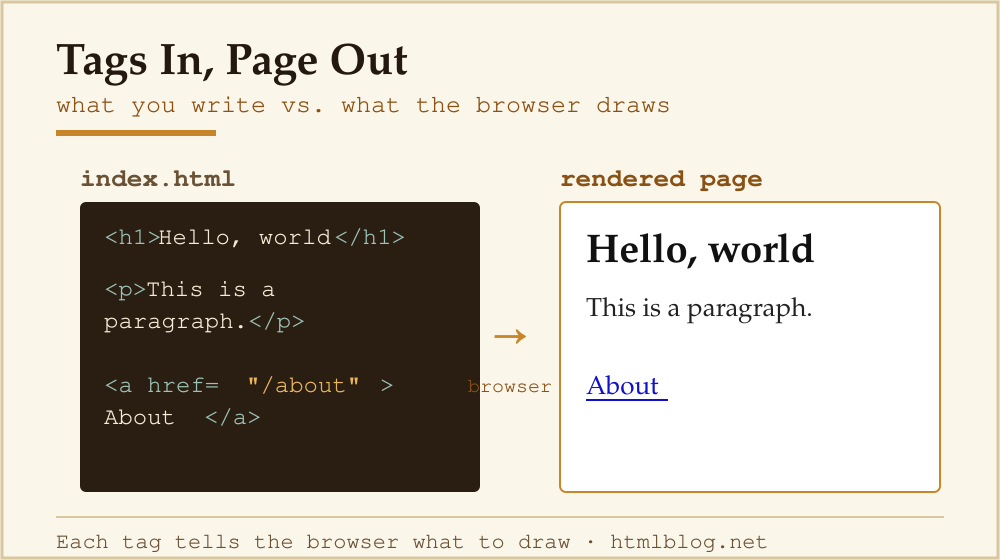
HTML stands for HyperText Markup Language. It is the standard language for describing the structure of a web page. Every heading, paragraph, image, and link you see in a browser exists because an HTML element told the browser to put it there.
HTML is not a programming language — it has no variables, loops, or logic. It is a markup language: a set of tags that wrap content and give it meaning. The WHATWG HTML Living Standard is the authoritative specification maintained by browser vendors today.
Is HTML a Programming Language?
This comes up constantly, so let’s settle it. HTML does not qualify as a programming language because it cannot perform computation — there are no conditionals, no loops, no functions. It is a declarative markup language. The MDN introduction to HTML describes it plainly: “HTML is a markup language that defines the structure of your content.”
That distinction matters if you are trying to figure out how long learning takes, because HTML has a much gentler on-ramp than JavaScript or Python. See how long it takes to learn HTML for a realistic timeline.
What Is an HTML Blog?
An HTML blog is a blog whose pages are built with hand-written or tool-generated HTML rather than a content management system generating the markup for you. That can mean:
- A folder of
.htmlfiles uploaded directly to a server. - A static-site generator (like Hugo or Eleventy) that outputs HTML from templates.
- A CMS (like WordPress) where the author understands enough HTML to edit post markup directly.
The phrase “HTML blog” is also used informally to mean any blog whose author writes or edits raw HTML — as opposed to relying entirely on a visual drag-and-drop editor.
Raw HTML vs CMS vs Static-Site Generator
| Approach | Setup effort | Ongoing effort | Performance | Best for |
|---|---|---|---|---|
| Raw HTML files | Low — just a text editor | High — every page edited by hand | Fastest possible | Learning, tiny single-page sites |
| Static-site generator (Hugo, Eleventy, Jekyll) | Medium — template setup | Low — write Markdown, build outputs HTML | Very fast (pre-built files) | Developers who want full control + speed |
| CMS (WordPress, Ghost, Squarespace) | Low–medium | Low — admin UI handles markup | Good with caching | Non-developers, teams, frequent publishing |
Most bloggers land on a CMS because it removes the need to touch HTML for every post. But knowing HTML makes you a better CMS user — you can fix broken layouts, add custom elements, and avoid the “mystery box” problem where you don’t understand why your post looks wrong.
How HTML Works: The Tag System
Every HTML document is a tree of nested elements. Each element is defined by an opening tag, its content, and (usually) a closing tag. Here is the minimal valid HTML document:
<!DOCTYPE html>
<html lang="en">
  <head>
    <meta charset="UTF-8">
    <meta name="viewport" content="width=device-width, initial-scale=1.0">
    <title>My First HTML Page</title>
  </head>
  <body>
    <h1>Hello, world</h1>
    <p>This is my first paragraph.</p>
  </body>
</html>
Save that as index.html and open it in any browser. You will see a heading and a paragraph — no server required. That is the entire machinery of the web in miniature.
How to Start Your First HTML Blog: A Step-by-Step Overview
- Learn the core tags. Master
<h1>–<h6>,<p>,<a>,<img>,<ul>/<ol>/<li>, and<div>/<span>. MDN’s HTML learning pathway is free and thorough. - Write your first page. Use the template above. Edit the
<title>and add a few paragraphs inside<body>. - Add a second page and link them. Create
about.htmland link to it with<a href="about.html">About</a>. You now have a multi-page site. - Add basic CSS. Drop a
<link rel="stylesheet" href="style.css">in the<head>and create astyle.cssfile. Once you are comfortable, find out how long CSS takes to learn. - Format your code. Before you deploy, clean up indentation and tag structure with our free HTML Formatter.
- Choose a host. For static HTML files, GitHub Pages and Netlify offer free hosting. For a CMS-backed blog, shared hosting with WordPress is the common entry point.
- Understand mobile. Add the viewport meta tag (it’s in the template above). For further reading, see optimizing for mobile.
HTML for Bloggers: What You Actually Need to Know
You do not need to write every page from scratch to benefit from knowing HTML. Most bloggers use WordPress or a similar CMS but regularly encounter situations where HTML knowledge saves them: pasting an embed code, fixing a broken image, adding a class to a table. See our HTML for bloggers guide for the specific tags that come up most often in a writing workflow.
What About HTML Templates?
An HTML blog template is a pre-built .html file with the page structure already in place — header, navigation, content column, footer. You swap in your text and images. Templates are a practical shortcut when you want control over output without designing from scratch. The risk is that free templates often carry outdated patterns (tables for layout, inline styles everywhere) that conflict with modern responsive design. If you start from a template, inspect it carefully in a browser before committing to it.
Going Deeper: Related HTML Topics
This guide is the hub for the “Learn HTML” cluster on this site. Dig into any of these next:
- A brief history of HTML — where the language came from and how it evolved.
- How long does it take to learn HTML? — realistic timelines by goal.
- How long does it take to learn CSS? — once you have HTML down, styling is next.
- HTML for bloggers — the practical subset a non-developer blogger actually needs.
- How to add an email link in HTML — a common “how do I do this?” task explained step by step.
Frequently Asked Questions
Is HTML enough to build a blog?
Technically yes — you can build a readable, working blog with HTML alone. In practice you will want CSS for styling and a way to manage multiple pages without copying the same header into every file. That is where static-site generators or a CMS earn their place. For a personal or portfolio project, raw HTML is a perfectly reasonable starting point.
Do I need to know HTML to use WordPress?
No, but it helps. WordPress handles most markup automatically through its block editor. You will hit situations — a broken embed, a custom shortcode, a theme tweak — where reading or editing a small block of HTML is the fastest fix. Even 20 minutes with MDN’s getting-started guide pays off quickly.
Is HTML a programming language?
No. HTML is a markup language — it describes the structure of content but cannot perform logic or computation. JavaScript handles behaviour; CSS handles presentation; HTML handles structure. The three work together but are distinct technologies.
What is the difference between HTML and a website?
HTML is one of the files (or file formats) that make up a website. A website also includes CSS for styling, often JavaScript for interactivity, images, and a server to deliver those files to visitors. HTML is the skeleton; everything else attaches to it.
Can I learn HTML for free?
Yes. The best free resources are MDN Web Docs, W3Schools, and freeCodeCamp’s HTML curriculum. All are up-to-date and browser-vendor endorsed (MDN in particular is maintained by Mozilla, Google, Microsoft, and others).