If you have already got the basics of HTML (if not, start here), you are ready for CSS. Expect one to two weeks to understand the fundamentals, two to three months to handle real layouts confidently, and six months or more before flexbox and grid feel fully natural.
CSS Learning Timeline at a Glance
| Skill level | What you can do | Estimated hours | Weeks at 1 hr/day |
|---|---|---|---|
| Basics | Change colours, fonts, spacing; understand selectors and the box model | 15–25 hrs | 2–4 weeks |
| Intermediate | Build responsive layouts with flexbox; write structured stylesheets | 60–100 hrs | 8–14 weeks |
| Confident / job-ready | CSS Grid, custom properties (variables), animations, component-scale systems | 200–400 hrs | 6–12 months |
These estimates assume roughly an hour of deliberate practice per day. More hours per day compresses the timeline; purely passive learning without building expands it considerably.
What Is CSS, Exactly?
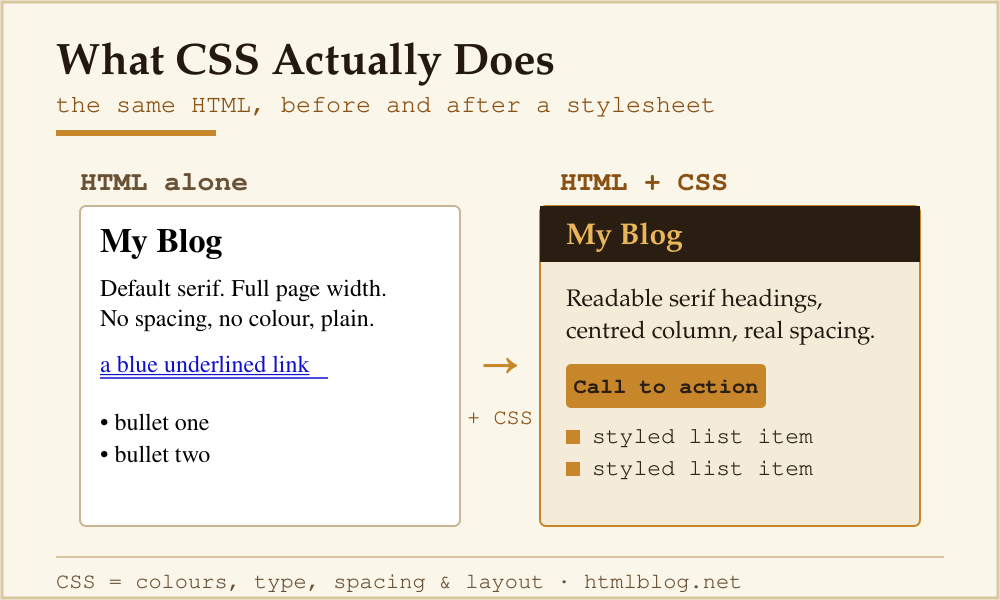
CSS stands for Cascading Style Sheets. It is the language that controls the visual presentation of HTML — colours, typography, spacing, layout, and responsiveness. Without CSS, every web page looks like a plain document with default browser styles.
CSS is not a programming language. Like HTML, it is declarative: you write rules that describe what elements should look like, and the browser handles the rendering. The W3C CSS Working Group maintains the specification. For implementation status across browsers, Can I Use is the standard reference.
The CSS Fundamentals You Need First
Before layout work, these four concepts need to be solid:
- Selectors and specificity. How CSS rules target elements — by tag, class, ID, attribute, or relationship — and how conflicting rules are resolved.
- The box model. Every HTML element is a box with content, padding, border, and margin. Misunderstanding the box model causes the majority of beginner layout bugs.
- The cascade. The “C” in CSS. Rules are applied in order of specificity, source order, and
!importantdeclarations. Understanding the cascade means knowing why a style is or is not applying. - Units. The difference between
px,em,rem,%, and viewport units (vw,vh) matters from day one. MDN’s guide to CSS values and units covers this well.
A Practical CSS Roadmap with Layout Milestones
- Week 1–2 — Syntax and selectors. Write your first stylesheet. Change fonts, colours, and spacing. Understand class vs ID selectors. Link a stylesheet to an HTML file via
<link rel="stylesheet" href="style.css">in the<head>. - Week 3–4 — Box model and flow. Work through padding, margin, border, and
box-sizing: border-box. Understand how block and inline elements behave differently. - Week 5–8 — Flexbox. This is the first major layout milestone. Flexbox lets you align items in a row or column, distribute space, and build navigation bars and card grids. Spend real time here — it unlocks most everyday layout work.
- Week 9–14 — Responsive design. Media queries, fluid widths, and the viewport meta tag. Build a layout that rearranges gracefully from desktop to mobile.
- Month 4–6 — CSS Grid. Grid handles two-dimensional layouts that flexbox cannot do cleanly. This is the second major layout milestone. MDN’s Grid guide is the place to learn it.
- Month 6+ — Custom properties, animations, architecture. CSS custom properties (variables) make large stylesheets maintainable. Transitions and animations add polish. Methodologies like BEM or utility-first approaches help teams write scalable CSS.
A Minimal CSS Example to Start With
/* Basic page styles */
body {
  font-family: Georgia, serif;
  line-height: 1.6;
  max-width: 700px;
  margin: 0 auto;
  padding: 1rem;
  background-color: #fafafa;
  color: #222;
}

h1 {
  font-size: 2rem;
  margin-bottom: 0.5rem;
}

a {
  color: #0060df;
  text-decoration: underline;
}
Paste that into a style.css file linked to any HTML page and you have a readable, centered layout immediately. Notice max-width and margin: 0 auto — those two declarations alone do more for readability than most beginner CSS effects.
Where CSS Gets Genuinely Hard
The syntax of CSS is not the challenge. What trips people up:
- Specificity conflicts. Styles are not applying and you do not know why. Learn to use browser DevTools to inspect computed styles — it shows exactly which rule is winning and why.
- Flexbox mental model. Understanding the difference between the main axis and cross axis, and how
justify-contentvsalign-itemsbehave, takes building actual components — not just reading about it. - Positioning.
position: absoluteis relative to the nearest positioned ancestor, not necessarily what you think. Many “why is my element in the wrong place?” problems come from here. - Global scope. CSS has no encapsulation by default. A rule targeting
paffects every paragraph on every page that loads the stylesheet. Naming systems (BEM, utility classes) are the practical solution, but you need to hit the pain before the solution makes sense.
CSS vs What Comes Next
CSS sits between HTML and JavaScript in the learning stack. If you are still working through HTML timelines, see how long HTML takes first. For the full picture of how HTML, CSS, and JavaScript fit together, the HTML basics guide covers this.
Once CSS feels comfortable, the next step is either JavaScript (for interactivity) or a CSS framework like Tailwind or Bootstrap (which gives you utility classes and pre-built components to speed up layout work). Neither is required to build a good-looking site — many excellent blogs run on plain HTML and CSS with no JavaScript at all.
Free Resources for Learning CSS
- MDN Learn CSS — the authoritative free course, maintained by browser vendors
- W3Schools CSS Tutorial — quick reference with live examples
- Can I Use — check browser support for any CSS property before using it
- freeCodeCamp Responsive Web Design — project-based, covers HTML and CSS together
- The Odin Project — open-source curriculum with CSS layout projects
Frequently Asked Questions
Do I need to know HTML before learning CSS?
Yes. CSS styles HTML elements — without understanding what you are styling, CSS rules do not make sense. A week on HTML basics is enough of a foundation. See how long HTML takes to learn for a starting roadmap.
How long does it take to learn CSS flexbox?
Most learners get a working understanding of flexbox in two to four weeks of daily practice. Fully internalising it — to the point where you reach for the right properties instinctively — takes three to five months of building real layouts. The MDN Flexbox guide is the standard reference.
Is CSS harder than HTML?
Yes, noticeably. HTML has a gentle learning curve because the feedback is immediate and errors are forgiving. CSS introduces concepts like the cascade, specificity, the box model, and layout systems (flexbox, grid) that require building a mental model rather than just memorising syntax. Most people spend twice as long getting comfortable with CSS as they do with HTML.
Can I learn CSS in a week?
You can learn the fundamentals — selectors, basic properties, how to link a stylesheet — in a week. You will not be able to build responsive layouts or handle real-world projects in that time. Think of one week as the foundation, not the destination.
What is the best first CSS project?
Style the HTML page you built while learning HTML. Apply fonts, colours, padding, and a centred max-width layout. Then add a navigation bar and a simple two-column section using flexbox. Small, concrete, finish-able projects teach more than open-ended exercises.