You opened DevTools, or read a PageSpeed report, or a Content-Security-Policy violation landed in your console — and there it was: elfsightcdn.com, a domain you have never typed in your life, loading a script on your own site.
elfsightcdn.com is the delivery host Elfsight uses to serve its widget code. The file everyone meets first is platform.js: I fetched it while writing this and got HTTP 200 and 44,086 bytes, about 14 KB over the wire after brotli, served through Cloudflare. It is not malware, and it is not evidence that you were hacked. It is there because somebody added an Elfsight embed — by hand, through a WordPress plugin, or via a Wix, Squarespace or Shopify app. Typing the bare domain into your address bar shows you nothing, because the apex 301-redirects to elfsight.com. You remove it by removing the embed, not by blocking the domain. Everything below you can verify yourself in about thirty seconds.
What Is elfsightcdn.com?
It is a static-asset host — nothing on it is meant to be browsed. Elfsight sells drop-in website widgets — reviews carousels, Instagram feeds, contact forms, countdown timers — and all of them reach your page through this domain.
The embed you were given, or inherited, has two halves:
<!-- Half 1: the container. This is where the widget renders. -->
<div class="elfsight-app-1a2b3c4d-5e6f-7a8b-9c0d-1e2f3a4b5c6d"
     data-elfsight-app-lazy></div>

<!-- Half 2: the loader. One per page, however many widgets. -->
<script src="https://elfsightcdn.com/platform.js" async></script>
That hex string is your widget’s public ID; one script tag serves every container on the page.
I read the loader rather than guessing at it. It registers on the window as eapps.Platform, walks the document for <div> elements whose class matches the elfsight-app- pattern, and appends a <link rel="preconnect">. Then it fires one XMLHttpRequest at core.service.elfsight.com/p/boot/, passing the widget IDs it found and the full URL of the page it is running on. The reply is JSON: your widget’s configuration plus an assets array of script URLs. The loader injects those itself, as fresh <script> elements with async set and, where the API supplies one, an integrity hash. Last it installs a MutationObserver, so widgets rendered later — in a modal, a tab panel — get picked up too.
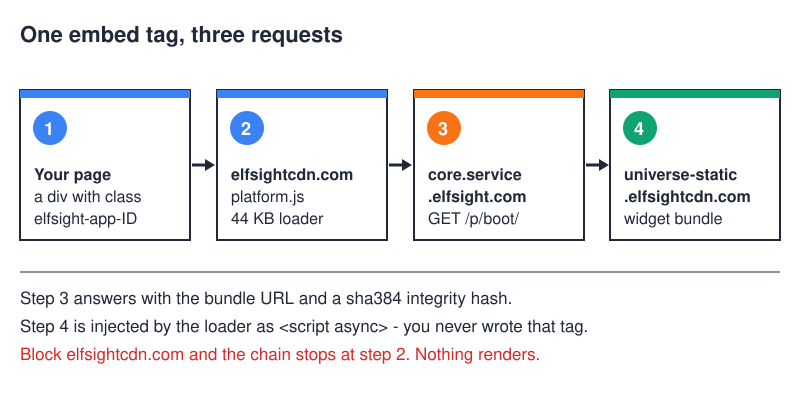
That integrity value is Subresource Integrity; the hashes in the boot response I inspected were sha384, one of the prefixes MDN lists as allowed. If the delivered file does not match, the browser “will refuse to load the resource, and return a network error.” Real protection against a tampered CDN edge — but not against the vendor shipping different code, since the vendor also supplies the hash.
Why Did It Appear On My Site?
Every case I have chased down came back to one of five things:
- Somebody pasted the embed by hand — a Custom HTML block, a theme template, or an “insert code in the head” plugin.
- The Elfsight WordPress plugin is installed, injecting the loader site-wide whether or not a page has a widget.
- A marketplace app. Elfsight publishes apps in the Wix App Market and the Shopify App Store; installing one adds the script everywhere. On Squarespace the same widget usually arrives as pasted code rather than as an app.
- A contractor left it behind. The widget went in for a launch, the launch happened, nobody cleaned up.
- You imported theme demo content that shipped with placeholder embeds.
A sixth situation is not really a cause: the hostname changed under you. Elfsight has more than one address for the same file. I downloaded elfsightcdn.com/platform.js and static.elfsight.com/platform/platform.js and compared them — identical, byte for byte, same 44,086 bytes, same MD5. A third URL, apps.elfsight.com/p/platform.js, 301-redirects to that static.elfsight.com copy, and Elfsight’s own install instructions now point at elfsightcdn.com. So if you have run the same widget for years and only just noticed a strange domain, nothing was injected — the embed was modernised.
How Do I Check What It Loads, In Thirty Seconds?
Don’t take my word for it. Open the page and:
- Press F12, or right-click and choose Inspect.
- Click the Network tab.
- Tick Disable cache, then reload. Skip it and the list will be suspiciously short.
- Type
elfsightinto the filter box.
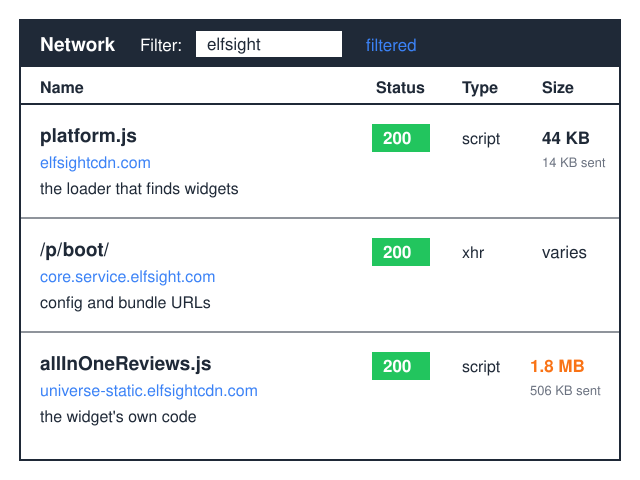
You should see three kinds of row, exactly as in the diagram above: platform.js from elfsightcdn.com, about 14 KB transferred and 44 KB once unpacked; a /p/boot/ request to core.service.elfsight.com with type xhr; and one script per widget from universe-static.elfsightcdn.com, where the real code lives. Click any row for the full URL, status and byte count.
From a terminal, one command tells the same story:
$ curl -sI https://elfsightcdn.com/platform.js

HTTP/2 200
content-type: application/javascript
cache-control: max-age=3600
server: cloudflare
A 200 with application/javascript means the host is alive and serving what it claims. That max-age=3600 matters later.
Which Elfsight Hosts Do What?
Seven domains, one of them a website. I resolved and requested every row below directly.
| Host | Role | Visitor’s browser hits it? | CSP directive |
|---|---|---|---|
elfsightcdn.com |
Serves platform.js, the loader |
Yes, on every page with an embed | script-src |
universe-static.elfsightcdn.com |
The per-widget JavaScript bundles | Yes, once a widget boots | script-src |
core.service.elfsight.com |
Config API — the /p/boot/ call |
Yes, as a background XHR | connect-src |
static.elfsight.com |
Icons and assets; also a duplicate of the loader | Yes, for icon sets | img-src (plus script-src on legacy embeds) |
phosphor.utils.elfsightcdn.com |
Image proxy — remote avatars fetched via a ?url= parameter |
Yes, in reviews and feed widgets | img-src |
widget-data.service.elfsight.com |
Data API used by some widget types | Sometimes, depending on the widget | connect-src |
dash.elfsight.com |
The dashboard where widgets are built | No — that one is you, logged in | Not needed |
Visit any asset host at its root and you get something that looks broken: static.elfsight.com and universe-static.elfsightcdn.com answer 403, core.service.elfsight.com and widget-data.service.elfsight.com answer 404, dash.elfsight.com bounces you to /apps. None of that is a fault — object stores and JSON APIs have no index page to give you.
Is elfsightcdn.com Spam Or A Virus?
No, and I want to be precise about why, because “relax, it’s fine” is not something you can act on. The domain belongs to the vendor, resolves to Cloudflare addresses, and serves one file over HTTPS with a sane content type. No obfuscated payload, no attempt to disguise what it does. The commercial picture — plans, limits, whether the product earns its keep — belongs in the Elfsight review, not here.
Now the part the reassuring articles skip. This is third-party JavaScript running in your origin with full DOM access, the same trust you extend to any analytics tag. From reading the code:
- It sends your URLs. The boot request carries
document.location.href— the complete address of the page, including its query string. - It sets cookies. The request goes out with credentials enabled, and the response set two cookies on Elfsight’s own domains when I called it: a short-lived
elfsight_viewed_recentlyflag and Cloudflare’s_cfuvid. Whether those need a consent banner where you operate is for whoever writes your privacy policy; my point is that a cookie audit missing them is incomplete. - The loader itself is clean. I searched all 44,086 bytes for
document.cookieandlocalStorageand found neither. The widget bundles are separate code from a separate host; I would not extend that finding to them.
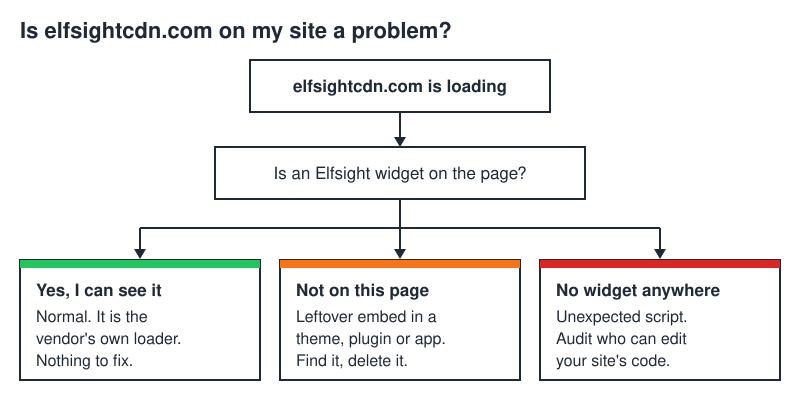
The scenario that genuinely warrants alarm is narrow and easy to test: the host loads, no Elfsight widget appears anywhere, and nobody on your team recognises the embed. That means something is injecting script you did not authorise, and the domain is the symptom rather than the disease.
What Does It Cost In Performance?
The loader is cheap — 44 KB raw, roughly 14 over the wire, fetched asynchronously. On its own it is not what is slowing your site down.
The bundles are another matter. I booted one real widget to see what arrives: the All-in-One Reviews widget, version 3.48.4, came to 1,757,797 bytes uncompressed and 506,251 bytes with brotli. Half a megabyte over the wire for one widget, before any images. Other types will differ — a countdown timer is not a reviews aggregator — but the shape holds: a small loader that pulls in something much larger.
MDN is blunt about what async saves you: the script “will be fetched in parallel to parsing and evaluated as soon as it is available”, but “once the download is complete, the script will execute, which blocks the page from rendering.” Parallel download, yes. Free execution, no. This surfaces in Lighthouse and PageSpeed Insights as “Reduce the impact of third-party code”, an audit that fails when “the total blocking time is greater than 250 ms.” One widget below the fold rarely trips it; several near the top of a page on a mid-range phone routinely do. If you are working through mobile optimization generally, embeds are usually the biggest line item you actually control.
There is a mitigation almost nobody uses. The container takes a lazy attribute, and the loader source recognises four values: disabled, enabled, first-activity and in-viewport.
<!-- Do not fetch the bundle until the widget scrolls into view -->
<div class="elfsight-app-1a2b3c4d-5e6f-7a8b-9c0d-1e2f3a4b5c6d"
     data-elfsight-app-lazy="in-viewport"></div>
Below the fold that is close to free performance for one attribute — the sort of trade-off the mobile optimization primer covers in general.
How Do I Allow elfsightcdn.com In Content-Security-Policy?
This is where I lost an afternoon once, so let me save you the same one.
script-src “specifies valid sources for JavaScript”, and if it is absent “the user agent will look for the default-src directive.” That fallback is the trap. Allow elfsightcdn.com in script-src and stop there, and platform.js downloads perfectly — then the boot request falls through to your restrictive default-src and dies. connect-src “restricts the URLs which can be loaded using script interfaces” and explicitly governs XMLHttpRequest — exactly what the loader uses. The result is a widget that never appears on a page that looks merely empty rather than broken.
A working starting point:
Content-Security-Policy:
  default-src 'self';
  script-src  'self' https://elfsightcdn.com
              https://universe-static.elfsightcdn.com;
  connect-src 'self' https://core.service.elfsight.com
              https://widget-data.service.elfsight.com;
  img-src     'self' data: https://static.elfsight.com
              https://phosphor.utils.elfsightcdn.com;
  style-src   'self' 'unsafe-inline';
Three notes, all from reading the code rather than a vendor doc.
style-src 'unsafe-inline' is not optional. Both the loader and the bundle create <style> elements at runtime, and the bundle uses a CSS-in-JS library that writes rules through insertRule. Lock inline styles down and the widget renders unstyled.
I left frame-src out deliberately. Copy-paste snippets elsewhere include it as though it were mandatory; the reviews bundle I disassembled creates no iframes at all. You need it only if your widget embeds someone else’s player or map — a YouTube gallery wants www.youtube.com. Add it when a violation names it.
Add https://static.elfsight.com to script-src for older embeds. If your script tag points at static.elfsight.com or apps.elfsight.com, that is the host the browser will actually request.
I went through this on this site with a different script: the Cloudflare Web Analytics beacon had been silently failing for weeks. Allowing the beacon host in script-src was necessary and nowhere near sufficient — the beacon reports through navigator.sendBeacon(), which connect-src governs just as it governs XMLHttpRequest, so the analytics endpoint had to be listed there too. While I was in there I found the share-button iframe had been blocked by frame-src for months and nobody had noticed, because a missing iframe looks like a design decision. Deploy as Content-Security-Policy-Report-Only first and let the browser tell you which directives it wants.
How Do I Remove elfsightcdn.com From My Site?
Delete the embed and the host stops being contacted. Blocking the domain at DNS or firewall level treats the symptom and leaves a dead container div in your markup.
On WordPress, check in this order: plugins first, since deactivating an Elfsight plugin removes the loader everywhere; then post and page content, where a Custom HTML block or an Elementor HTML widget is the usual hiding place; then the theme’s header.php and footer.php, plus any “insert headers and footers” utility.
Two commands find it faster:
# Which posts and pages contain a widget container?
# (adjust the table prefix if yours is not wp_)
wp db query "SELECT ID, post_title, post_status FROM wp_posts \
  WHERE post_content LIKE '%elfsight-app-%';"

# Which files reference the host?
grep -rn "elfsightcdn\|elfsight-app-" wp-content/themes/ wp-content/mu-plugins/
On a hosted builder there is no filesystem to grep. Wix keeps it under Settings then Custom Code, or as an App Market app; Squarespace puts it in Code Injection or a Code block; Shopify hides it in theme.liquid or an installed app.
Then verify, because caching will lie to you. Hard-reload with the cache disabled and re-run the Network filter — you want zero rows. If the script survives, purge your page cache and CDN before concluding you missed a copy. Nothing else depends on the loader, so the widget disappears and that is the whole blast radius. For something lighter in its place, the guide to embedding HTML widgets shows what the alternatives look like in markup.
FAQ
Is elfsightcdn.com a virus?
No. It is a vendor-owned asset host serving a documented JavaScript loader over HTTPS behind Cloudflare. Antivirus and ad-blocker warnings are generic third-party-script heuristics, not detections of anything malicious in the file. It is still third-party code with full DOM access, so treat it like every other tag: know why it is there and who added it.
Why does elfsightcdn.com redirect to elfsight.com?
Because the apex has no site to show you — request it and you get an HTTP 301. Asset hosts serve files at known paths; they do not render a homepage. Same reason static.elfsight.com answers 403 and core.service.elfsight.com answers 404 at their roots. An empty-looking domain is ordinary infrastructure, not a red flag.
Can I host platform.js myself?
You can copy the 44 KB file, but it buys little. The config API host is compiled into the loader, and bundle URLs come back from that API pointing at universe-static.elfsightcdn.com — the vendor’s hosts stay on the critical path. The code checks an override, window.eappsCustomPlatformUrl, but using it means running your own compatible API. The file also ships cache-control: max-age=3600, so a mirror you took once will go stale and break quietly.
Will my widgets break if I block the domain?
Yes, immediately and completely. Blocking elfsightcdn.com stops the loader running, so nothing discovers your container divs and nothing renders — visitors see empty space. If that is the outcome you want, delete the embed instead: same result, no orphaned markup, no console errors.
Does elfsightcdn.com slow down my site, and by how much?
The loader alone is negligible: 44,086 bytes uncompressed, about 14 KB transferred, fetched with async. The bundle it pulls in is the real cost — the reviews widget I measured came to 1,757,797 bytes uncompressed and just over 506 KB with brotli. One lazy-loaded widget below the fold is a fair trade; several above it fails the third-party-code audit in PageSpeed Insights.


![iPhone screen yellow? [Solution]](https://htmlblog.net/wp-content/uploads/2022/10/iphone-screen-yellow-768x432.webp)