
A TikTok video stuck at 0 views is almost always under review, not broken. TikTok’s automated systems screen every upload — usually within a few minutes, but sometimes up to 48 hours — before the video enters the For You feed. If the counter hasn’t moved after two days, there is a fixable reason.
Below are the most common causes and, more importantly, the numbered steps to address each one.
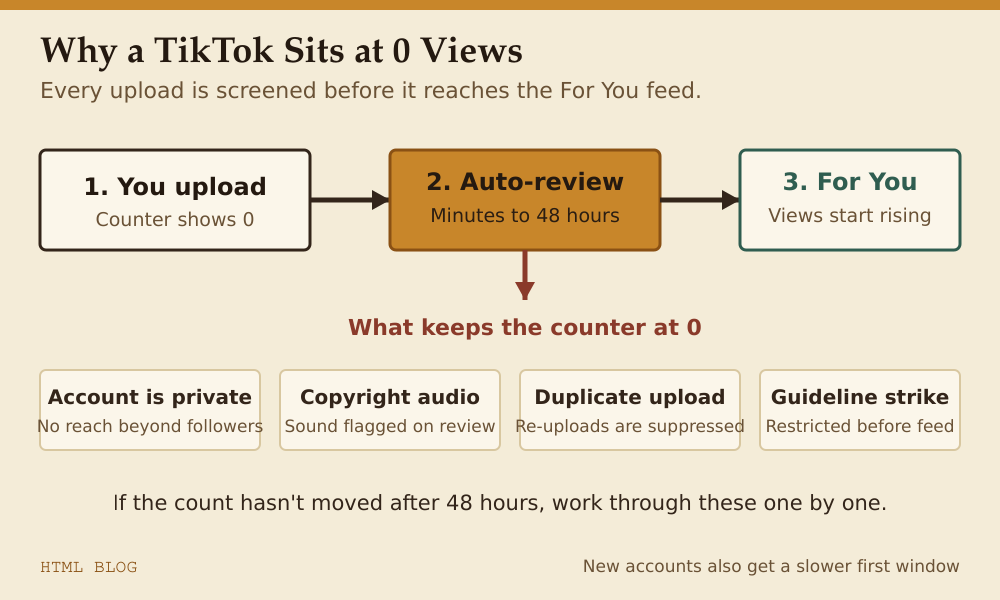
Why your TikTok video shows 0 views
| Cause | What it means | Typical resolution time |
|---|---|---|
| Video under review | Automated content screening before distribution | Minutes to 48 hours |
| Account is private | Only your followers can see your videos | Instant after switching to public |
| Copyright audio detected | Sound flagged before the video reaches the feed | Swap the audio or appeal |
| Duplicate content | TikTok suppresses re-uploads of content already on the platform | Only original uploads rank |
| Community Guidelines violation | Video removed or restricted before views accumulate | Appeal via the app |
| New account | Brand-new accounts sometimes have a slower initial distribution window | Post consistently for a few days |
How to fix 0 views on TikTok — step by step
- Wait at least 24–48 hours. Most review cycles complete within minutes, but batch processing delays do happen. If the view count hasn’t moved at all after two days, move on to the next steps.
- Check your account privacy setting. Open the app → Profile → ☰ (top right) → Settings and Privacy → Privacy → set account to Public. A private account delivers zero organic reach outside your existing followers.
- Review the video for a violation notice. Go to your profile, tap the video. If TikTok has flagged it, you’ll see a notice below the view count. You can appeal directly from that screen.
- Check the audio. If TikTok detected copyrighted music, the video may be restricted in certain regions or suppressed entirely. Re-edit the video using a TikTok-licensed sound from the app’s sound library, or use original audio.
- Verify you’re not re-uploading existing content. TikTok’s algorithm identifies duplicate videos and does not distribute them. If you’re sharing someone else’s video, only the original uploader’s version gets pushed to the For You page.
- Check TikTok’s server status. Occasionally platform-wide issues delay view counts. Check TikTok’s status page or search “TikTok down” on a second device to rule this out.
- Give a new account more time. TikTok’s distribution algorithm initially limits reach for brand-new accounts. Post three to five videos consistently before drawing conclusions.
Why TikTok view count gets stuck and won’t update
The view counter can freeze temporarily even when real views are coming in — this is a display caching issue on TikTok’s side, not a problem with your video. If your notifications show engagement (likes, comments, follows) but the view number isn’t moving, the actual distribution is likely working fine. The displayed count usually corrects itself within a few hours.
Can you view your own TikTok to increase the count?
No. TikTok explicitly does not count views from the account that uploaded the video. Playing your own content loops does nothing for your metrics.
What counts as a view on TikTok?
A view is counted the instant the video begins playing for another user — there is no minimum watch duration threshold. Each replay by the same user counts as an additional view. This differs from YouTube, where a portion of the video typically needs to be watched before a view registers.
How many views does it take to go viral on TikTok?
There is a long road between 0 and viral. Most creators treat 500,000 views as the marker for a video gaining genuine traction; 1 million views and above is broadly considered viral on the platform.
Frequently asked questions
- My TikTok video has been at 0 views for a week. What should I do?
- First, confirm your account is public and check for a violation notice on the video itself. If neither applies, the safest move is to delete the video and re-upload original content. Avoid re-uploading content taken from elsewhere — TikTok suppresses duplicate uploads regardless of the account posting them.
- Does TikTok shadowban accounts?
- TikTok does not officially use the term, but repeated community guideline violations — even minor ones — can result in reduced distribution for a period. If multiple videos are showing 0 views and no violation notices, try a brief posting pause (24–48 hours) before uploading fresh, original content.
- Will using popular hashtags help get views?
- Moderately. Hashtags help TikTok categorise your content, but the For You page algorithm is driven primarily by watch time and completion rate — how long viewers watch and whether they finish the video. A strong hook in the first two seconds matters more than any hashtag strategy.