POWR.io offers over sixty embeddable plugins for websites — forms, popups, social feeds, countdown timers — with a free tier and paid plans that scale with traffic. This review covers what the platform delivers, its pricing structure, and when it is worth using.
What Is POWR.io?
POWR (Power Your Web) is a SaaS platform that provides embeddable plugins for websites. Unlike Elfsight, which calls its products “apps,” POWR calls them plugins — though the distinction is mostly marketing. Both work the same way: you configure a plugin in the POWR dashboard, copy an embed snippet, and paste it into your HTML or CMS.
POWR’s catalogue of 60+ plugins spans five goal-oriented categories: Boost Conversions, Gain Followers, Collect Information, Support Customers, and Engage Visitors. The most-used plugins are Form Builder, Social Feed, Countdown Timer, Popup, and PayPal Button.
POWR Pricing
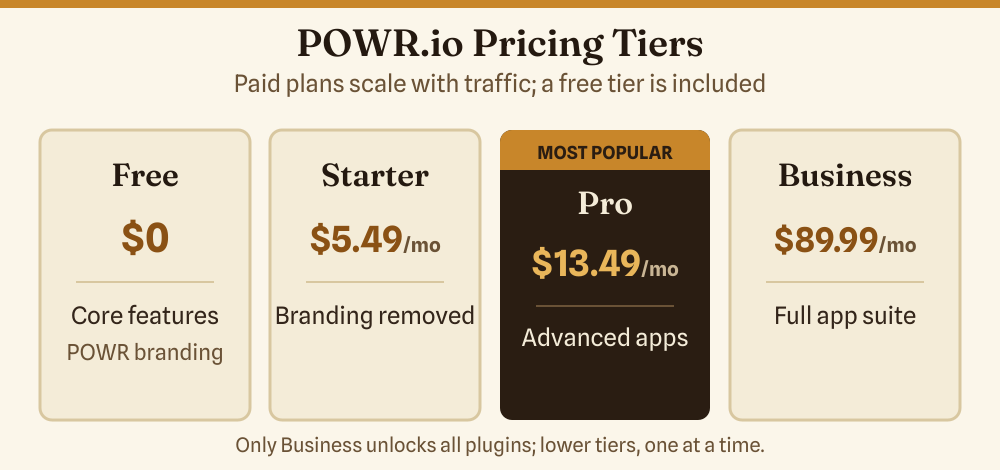
| Plan | Features | Monthly Price |
|---|---|---|
| Free | Limited features, POWR branding shown | Free |
| Starter | Removes branding, increased limits, one plugin at a time | $5.49/mo |
| Pro | Advanced features, priority support, one plugin at a time | $13.49/mo (most popular) |
| Business | Full access to all 60+ plugins simultaneously | $89.99/mo |
Annual and biennial billing options are available with automatic discounts (annual saves approximately 10–15% versus monthly). The Business plan is the only one that unlocks all plugins simultaneously; lower tiers give you one plugin at a time.
POWR Pros and Cons
Pros
- No-code setup — build and configure the plugin visually in the dashboard, then copy one embed snippet. No server access needed.
- Works on any CMS — POWR embeds work on WordPress, Squarespace, Wix, Shopify, Weebly, or plain HTML pages.
- Free tier available — test any plugin on your live site before committing to a paid plan.
- WYSIWYG editor — what you configure in the dashboard reflects closely in the live widget, reducing surprise layout issues.
- Large user base — broad community means common issues have documented solutions.
Cons
- Branding on free plan — the free tier shows POWR branding, which looks unprofessional on client sites.
- Per-plugin pricing at lower tiers — if you need five different plugins, you pay for each separately unless you are on Business.
- Feature limits can feel arbitrary — some useful features (custom CSS, advanced analytics) are gated behind higher plans.
- External CDN dependency — like all SaaS widget platforms, if POWR’s servers have downtime your widgets disappear. Not unique to POWR but worth understanding before relying on it for critical site functions.
- Mixed reviews on plugin quality consistency — some plugins are highly polished; others feel less maintained. Check the specific plugin you want before buying.
Popular POWR Plugins Explained
A short description of the six most-used plugins, since catalogue size alone does not tell you much:
- Form Builder — drag-and-drop form creator. Supports multi-step forms, email notifications, and integrations with Mailchimp and Google Sheets.
- Social Feed — aggregates posts from social platforms and displays them in a grid or carousel. Check the current POWR dashboard for the latest supported platforms, as social APIs change frequently.
- Countdown Timer — displays a countdown to a date/time. Standard conversion tool for launches and sales.
- Popup — triggers an overlay on entry, exit intent, or scroll depth. Useful for newsletter opt-ins or discount offers.
- PayPal Button — adds a payment button linked to a PayPal account. Useful for simple transactions without a full ecommerce setup.
- Multi Slider — image/video slider with CTA overlay. Replaces a custom-built testimonial or product carousel.
POWR vs. Elfsight
Both platforms are direct competitors. POWR has a slight edge in form-building and conversion-focused plugins; Elfsight has a broader reviews and social-proof catalogue. Read the full Elfsight review to compare side-by-side, and see the HTML website widgets guide for a wider platform comparison.
Who Should Use POWR?
POWR works well for small business owners who need a quick form, popup, or countdown without writing code. It is particularly useful on Wix and Squarespace sites where server-side plugins are not available and embedding HTML is the primary extension method. For WordPress sites, weigh POWR against native WordPress plugins — a dedicated contact-form plugin may offer more control at lower cost.
Frequently Asked Questions
Is POWR.io free?
POWR has a free plan that lets you test any plugin on your site. The free tier has feature limits and shows POWR branding. It is enough to evaluate whether a plugin fits before paying.
Is POWR.io safe?
POWR is a legitimate hosted service. As with any third-party embed, you are trusting their CDN on your page. Reviews are mixed — check recent user reviews on platforms like G2 or Capterra before committing. Review their privacy policy if your site collects user data, to understand data processing obligations.
Does POWR work with WordPress?
Yes. POWR provides a WordPress plugin in the plugin directory. You can also paste the embed snippet directly into a Custom HTML block without installing any plugin.
What is the difference between POWR and Elfsight?
Both are cloud-hosted widget/plugin platforms with free tiers and paid plans. POWR’s strength is conversion-focused plugins (forms, popups, payments). Elfsight’s strength is social-proof and reviews widgets. Both work on any CMS via embed code.